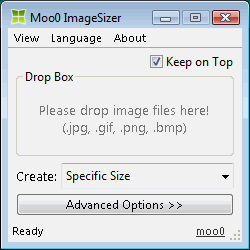 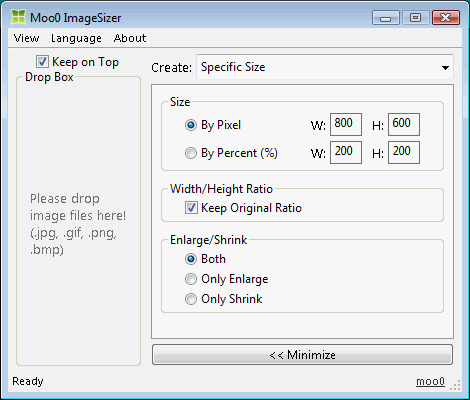
| Omvandla bildstorlekar Moo0 BildStorlekändrare låter Dig lätt omvandla bilder till olika storlekar. Det är lätt att anända, och Du beöver bara dra eller släppa filer i programfönstret. Detta verktyg kan vara mycket kraftfullt, om Du arbetar med design och undrar över vilka storlekar att välja.
Norwegian stöd möjliggjort av Øistein. Tack så mycket!! Spanska stöd möjliggjort av Descko. Tack så mycket!! | |||||||||||||
| Sidtitel: | ||||||||||||||
| Sidsajt: | ||||||||||||||
| HTML flik: | ||||||||||||||
| Språk: | Arabiska, Vitryska, Brasiliansk Portugisiska, Bulgarian, Kinesiska(Förenklad), Kinesiska(Traditionell), Croatian, Tjeckiska, Danska, Holländska, Engelska, Estonian, Finnish, Franska, Tyska, Greek, Hebrew, Hindi, Ungerska, Indonesian, Italienska, Japanska, Koreanska, Norwegian, Persian, Polska, Portuguese, Romanian, Ryska, Serbian (Cyrillic), Slovakiska, Slovenian, Spanska, Svenska, Thai, Turkiska, Ukrainian, Vietnamesiska, 2 other languages (partial) - [ Översättare (26) ] | |||||||||||||
| OS: | Windows XP/2003/Vista/7/8.1/10 | Lätt att använda: | Mycket lätt | |||||||||||
| Version: | 1.24 | |||||||||||||
| Senast uppdaterad: | 2019/06/28 [ Uppdateringshistorik (21) ] | |||||||||||||
| PAD fil: | [ om Du kör program, som listar sajt... ] | |||||||||||||
| Hämtning: |
| |||||||||||||
| Storlek: | 3.59 MB | |||||||||||||
| Licens: | Gratis (Ej kommersiellt bruk) Bruka på arbetsplats / Internet Kafé?
| |||||||||||||
| Respons: | ||||||||||||||
| FAQ: | ■ (Symptom) The program suddenly doesn't start up one day? stopped working properly? on Windows 10/8.1? This probably happens when "Windows SmartScreen" hinders our program from working. In this case, please try the following before the installation. 1. Before the installation, right-click on the installer file and open the file "Property". 2. At the bottom of "General" tab, if you see "Security: This file came from another computer...", select "Unblock" check box, and "Apply" and "OK". 3. If you install the program after it, it may be able to prevent many problems caused by "Windows SmartScreen" or some other security products. Or, you can actually turn off this problematic feature of Windows itself: (only if you feel too troublesome to do this every single time.) https://ugetfix.com/ask/how-to-disable-windows-smartscreen/ This happens to every software vendor who doesn't or can't donate $300 to Microsoft every single year (EV signature purchase), and especially when the program file is still new. This kind of problems started to get reported since the early of 2019. | |||||||||||||
